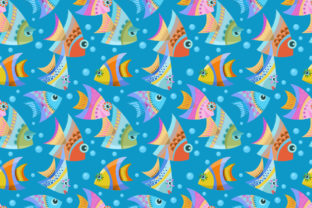
Colorful Design Fish Seamless Pattern
If you're looking for vibrant, playful, and professionally versatile background art—especially for textiles, packaging, web design, or print-on-demand products—the Colorful Design Fish Seamless Pattern is a smart choice. It’s not just eye-catching; it’s engineered for real-world use: fully seamless, high-resolution (5000 × 5000 px), and delivered in both JPG and EPS 8 formats—so it works smoothly in Affinity Designer, Adobe Illustrator, Photoshop, and even modern web tools.
Why This Pattern Stands Out (Beyond Just “Cute Fish”)
Unlike generic clipart or low-res downloads, this pattern balances artistic energy with technical precision. Each fish is hand-styled with intentional color harmony—not random rainbow chaos—and spaced to repeat flawlessly across any surface. That means no visible seams when tiled on fabric rolls, wallpaper mockups, or app backgrounds. It’s designed to scale without pixelation, hold detail in small print (like business cards), and retain clarity in vector-based edits thanks to the EPS 8 file.
Creators often overlook how much time and polish goes into *true* seamlessness. Many free “seamless” patterns fail at larger scales or break when rotated or resized. This one doesn’t—it’s stress-tested at multiple zoom levels and tile configurations. That reliability saves hours of manual patching, especially if you’re prepping files for print vendors or client handoffs.
Mistake #1: Assuming “High-Res JPG” Means “Ready for Everything”
A 5000 × 5000 px JPG looks sharp on screen—but if you need to recolor individual fish, adjust spacing, or export crisp lines for laser cutting or embroidery, raster alone falls short. Relying only on the JPG limits flexibility and risks quality loss during edits.
Better approach: Use the EPS 8 file as your working source. It’s editable in Illustrator and Affinity Designer—meaning you can isolate elements, tweak hues with global swatches, resize infinitely, or convert to SVG for web use. Keep the JPG for quick previews, social posts, or CMS uploads where vector isn’t supported.
Mistake #2: Skipping Color Mode Checks Before Printing
Many users drop the JPG straight into a print layout without verifying color space. The included files are RGB—ideal for screens and digital use—but most commercial printers require CMYK. Converting late in the process can shift bright teals or coral tones unexpectedly.
Better approach: If your end use is physical (e.g., tote bags, stationery, brochures), open the EPS in Illustrator first, then convert to CMYK *before* adjusting colors or applying effects. Use Pantone libraries or soft-proofing tools to preview how colors translate. When in doubt, ask your printer for their preferred workflow—they’ll often supply ICC profiles you can embed.
Mistake #3: Overlooking Tile Dimensions in Layout Software
Some designers assume “seamless” means “auto-tile.” But programs like Figma, Canva, or even older versions of InDesign won’t auto-repeat unless you manually define the tile size—or use pattern swatches correctly. Dropping the image once and stretching it creates distortion. Tiling manually without matching the exact 5000 × 5000 px boundary introduces micro-gaps or overlaps.
Better approach: In Illustrator, drag the EPS into Swatches panel → it becomes a live, scalable pattern fill. In Affinity Designer, use the “Repeatable Pattern” tool and set the repeat unit to 5000 px. For CSS or web use, export a single tile (not the full canvas) and apply via background-size—ensuring clean, infinite tiling without blur or offset.
Mistake #4: Using It Without Contextual Testing
A bold fish pattern energizes a kids’ book cover—but may overwhelm minimalist branding or formal presentations. Likewise, pairing it with clashing fonts or overly busy illustrations dilutes its impact instead of enhancing it.
Better approach: Test early and contextually. Place the pattern behind real content—not just color swatches. Try it at 10%, 30%, and 70% opacity. Print a 2×2 inch swatch on your target material (e.g., cotton duck, kraft paper, matte vinyl). See how lighting, texture, and viewing distance affect perception. Sometimes less repetition—or cropping to highlight a single motif—creates stronger focus than full coverage.
What to Verify Before You Download or Deploy
- File integrity: Confirm both JPG and EPS open cleanly in your primary design app—no missing layers, embedded fonts, or rendering errors. EPS 8 should open in Illustrator CS6+ and Affinity Designer 1.9+ without conversion prompts.
- Tile behavior: Open the JPG in Photoshop or GIMP, then use Filter > Other > Offset (set horizontal/vertical to 2500 px). Look for hard edges or misaligned fish—true seamlessness shows zero discontinuity.
- Licensing scope: Check usage rights. This Colorful Design Fish Seamless Pattern permits commercial use—including merch, client projects, and digital templates—but prohibits resale of the pattern file itself or claiming authorship. If you’re building a SaaS tool or white-label product, confirm extended license options apply.
- Color consistency: View the file on two devices (e.g., laptop + phone). If greens look muddy on one screen, calibrate or soft-proof rather than assuming the file is flawed.
Real-World Uses That Work Well—And Why
Small business owners use this pattern for eco-friendly product labels—its organic shapes pair naturally with sustainable messaging. Educators adapt sections for classroom posters or interactive PDFs, using the EPS to extract single fish as draggable elements. Freelancers build branded Notion dashboards or Canva presentation kits, applying the pattern as subtle headers or section dividers—not as wallpaper, but as intentional rhythm.
One freelance packaging designer recently used the pattern for a line of ocean-themed bath salts. Instead of covering the entire box, she masked it to flow diagonally across the front panel, then added a matte foil stamp of a single fish silhouette over the top. The result felt custom—not template-driven—because she treated the pattern as raw material, not a finished solution.
Final Thought: It’s a Tool, Not a Fix
The Colorful Design Fish Seamless Pattern delivers exceptional value—if you match its strengths to your actual workflow. It won’t compensate for weak typography, inconsistent branding, or unclear audience targeting. But in skilled hands, it adds warmth, movement, and memorability without sacrificing professionalism.
Before you download, ask: What problem am I solving? What output format do I actually need? And what’s the smallest effective application—not the flashiest one? That mindset turns a great asset into a reliable, repeatable part of your creative process.